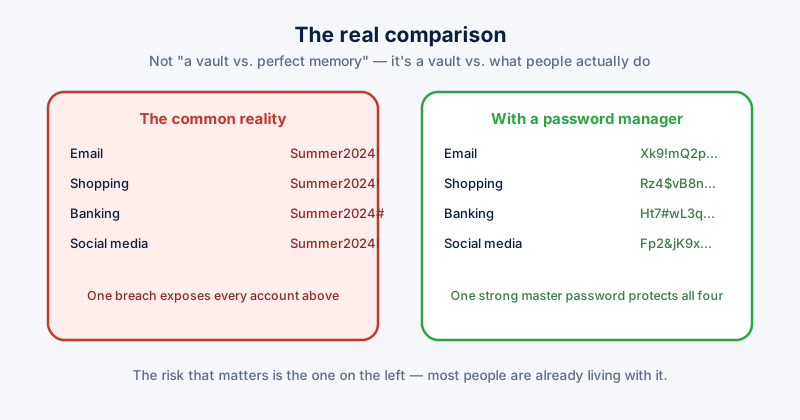
"Isn't it risky to put all your passwords in one place?" is a fair question, and the honest answer is that it depends entirely on what you're comparing it to. Compared to an imaginary world where you remember forty unique, strong passwords, yes, a password manager is a single point of failure. Compared to what most people actually do — reusing a handful of passwords across dozens of sites — a password manager is a large security improvement, not a risk.
The real alternative isn't perfect memory
The realistic baseline is password reuse: the same password, or close variations of it, across email, banking, shopping, and social accounts. When any one of those sites has a data breach — and breaches happen constantly, at companies with far more security staff than most individuals could ever match — every other account using that same password is now exposed too. This is called credential stuffing, and it's one of the most common ways accounts actually get compromised.
A password manager's core value is making unique, random passwords for every single site practical, so a breach at one site can't be used against any other account.
Local vs. cloud-synced managers
- Cloud-synced managers store your encrypted vault on the provider's servers so it syncs across your devices automatically. Convenient, and the vault is encrypted before it leaves your device — but you're trusting the provider's infrastructure and their encryption implementation.
- Local managers keep the encrypted vault only on your own device, or wherever you choose to store or back it up yourself. Nothing to breach on a remote server, at the cost of handling your own sync and backup.
Neither is unconditionally "the safe one" — a local vault with no backup that gets lost in a drive failure is its own kind of catastrophic risk. The right choice depends more on your own habits around backups and how many devices you use than on which model is theoretically more secure.
What actually goes wrong
When password manager incidents make the news, the cause is almost never "the encryption was broken." It's usually one of these:
- A weak or reused master password — the one password that protects everything else needs to be genuinely strong and used nowhere else, full stop
- No two-factor authentication on the account protecting the vault, where one exists
- Malware already running on the device reading the vault after it's unlocked — a compromised endpoint defeats any password manager, because the manager has to hand over the real passwords to something on that device eventually
- Phishing that tricks someone into typing their master password into a fake login page
This is why a password manager doesn't replace the basics — a strong, unique master password, two-factor authentication where it's offered, and not running unknown software — it depends on you keeping those basics too.
Making the choice
For most people, the practical question isn't "is a password manager safe" in the abstract — it's whether the manager uses strong, well-reviewed encryption (AES-256 is the standard to look for), whether the master password is genuinely strong, and whether two-factor authentication is enabled wherever it's available. Get those three right and a password manager is meaningfully safer than the reused-password status quo it replaces.
ETA System Doctor's Password Vault keeps your passwords local and encrypted on your own device rather than syncing to a remote server, includes a built-in generator for genuinely random per-site passwords, and can import existing saved logins from Chrome and Edge — plus a CSV import for anything saved elsewhere — so switching over doesn't mean re-entering every password by hand.