"Is this website safe?" is the right question to ask before clicking a link from an email, a text, or a search result you don't fully trust. There are good manual ways to check. There is also a hard limit on manual checking: it only works on the links you remember to check, and the ones that get you are rarely the ones you were suspicious of in the first place.
Checking manually
- Hover before you click — most browsers and email clients show the real destination URL in the corner. If the visible text says one thing and the real link goes somewhere else, stop there.
- Look for HTTPS — a padlock means the connection is encrypted, not that the site is trustworthy; plenty of scam sites now use HTTPS too, so treat this as a minimum, not proof of safety.
- Check the domain closely — a single swapped letter or an extra word before the real domain ("paypal-secure-login.com") is one of the most common phishing patterns.
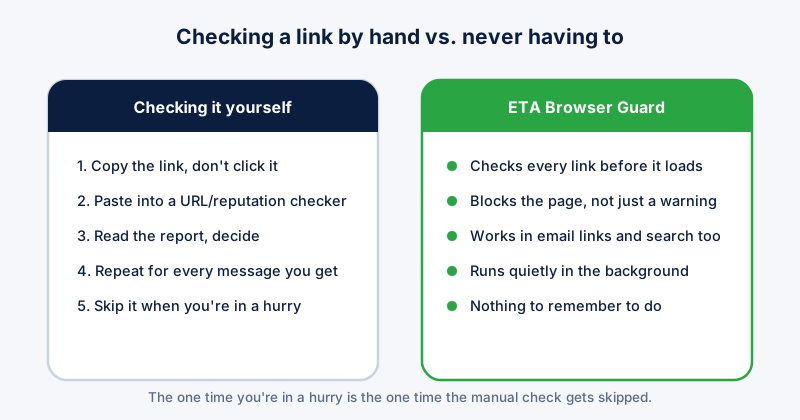
- Paste the URL into a checker rather than opening it — Google Safe Browsing's site status page and VirusTotal's URL scanner both work without visiting the page yourself.
Where manual checking breaks down
Every method above requires you to stop, notice something is off, and go run a check — every single time, for every link. The links that cause damage are almost never the obviously sketchy ones; they're the convincing one buried in a busy inbox at the end of a long day, when the checking step is the first thing to get skipped.
This is the exact gap ETA Browser Guard is built to close. It checks every link against real-time phishing data before the page loads, automatically, in email, search results, and everywhere else — so the one time you're too rushed to check by hand is no longer the one time it matters most.
What real-time protection catches that manual checks don't
New phishing domains go live constantly and often survive only hours before being taken down, which is long enough to catch people using week-old bookmarks of "known bad" sites but not long enough for most manual lookups to have caught up. Real-time checking works against current threat data at the moment you click, not a list that's already stale.
The complete answer
Manual checks are worth knowing and cost nothing, so use them when something feels off. But the only way to be protected on every link, every time, without having to remember to check, is automatic protection running in the browser itself — which is what ETA Browser Guard does: it checks before the page loads and blocks it outright rather than showing a warning you can click past.
Installing it means you stop needing this checklist at all. That's the actual point of buying it: not one more tool to run, but the end of having to personally verify every link that lands in front of you.